SMS alerts from ORYKSA AI
ORYKSA AI is operated by W8 Atlantic Unipessoal Lda. Account holders can choose to receive SMS alerts about their own account. SMS is optional and off by default.
How to opt in
- Sign in at app.oryksa.com.
- Open Account > Notifications > SMS.
- Type your own mobile number with the country code.
- Tick the SMS consent box (it is unchecked by default) and turn SMS on.
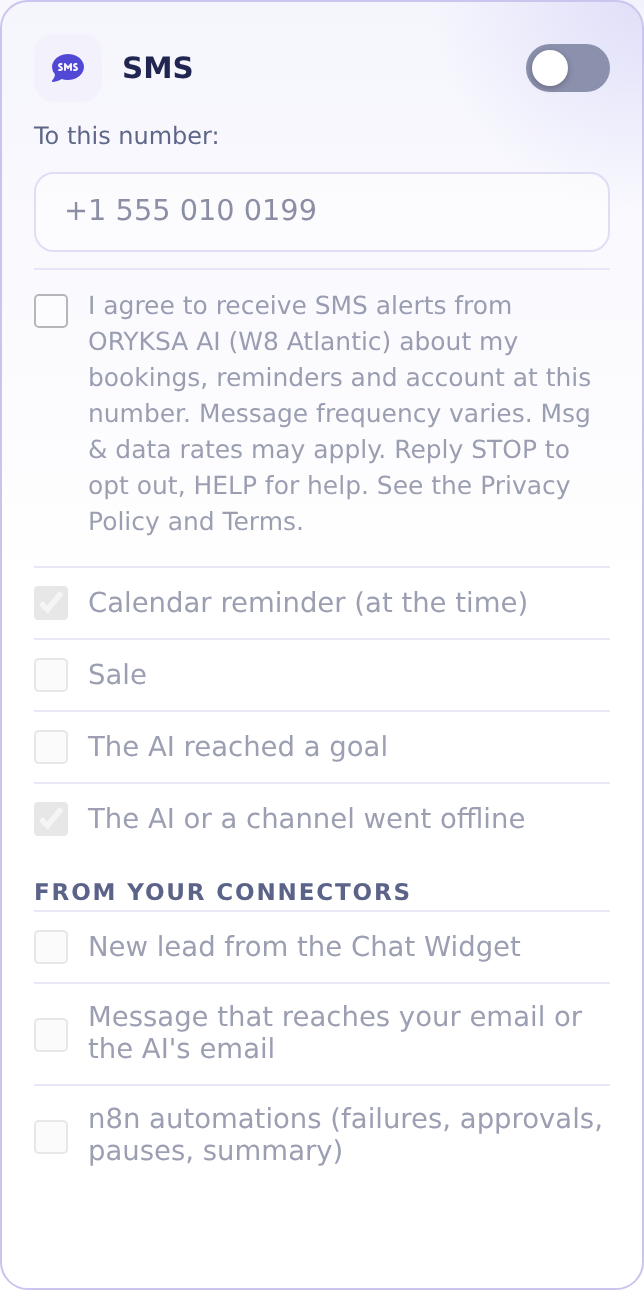
This is the SMS card in Account > Notifications:
The consent text
I agree to receive SMS alerts from ORYKSA AI (W8 Atlantic) about my bookings, reminders and account at this number. Message frequency varies. Msg & data rates may apply. Reply STOP to opt out, HELP for help. See the Privacy Policy and Terms.
The confirmation message
ORYKSA AI (W8 Atlantic): You are now subscribed to SMS alerts about your bookings, reminders and account. Msg frequency varies. Msg & data rates may apply. Reply HELP for help, STOP to opt out.
What you receive
Booking and appointment reminders, alerts about new messages and bookings handled by your AI assistant, account and service notices (for example when your WhatsApp connection goes offline) and support replies. No marketing messages.
Stop and help
Reply STOP to any message to stop, or turn SMS off in Account > Notifications. Reply HELP or write to [email protected] for help. Message frequency varies. Message and data rates may apply. Consent is not a condition of purchase.
Privacy
We do not sell or share your SMS opt-in data or personal information with third parties for marketing purposes. Read the Privacy Policy and the Terms.